[TryHackMe][CompTIA_Pentest+][Nmap]
- 6 minsSummary:
An in depth look at scanning with Nmap, a powerful network scanning tool.
Tasks
- Introduction
- Nmap Switches
- TCP Connect Scans
- SYN Scans
- UDP Scans
- NULL, FIN and Xmas
- ICMP Netwok Scanning
- Overview
- Working with the NSE
- Searching for Scripts
- Practical
Introduction
Question : What networking constructs are used to direct traffic to the right application on a server ?
Answer : PortsQuestion : How many of these are available on any network-enabled computer ?
Answer : 65535Question : [Research] How many of these are considered “well-known”? (These are the “standard” numbers mentioned in the task)
Answer : 1024Nmap Switches
Question : What is the first switch listed in the help menu for a ‘Syn Scan’ (more on this later!) ?
Answer : -sSQuestion : Which switch would you use for a “UDP scan” ?
Answer : -sUQuestion : If you wanted to detect which operating system the target is running on, which switch would you use ?
Answer : -OQuestion : Nmap provides a switch to detect the version of the services running on the target. What is this switch ?
Answer : -sVQuestion : The default output provided by nmap often does not provide enough information for a pentester. How would you increase the verbosity ?
Answer : -vQuestion : Verbosity level one is good, but verbosity level two is better! How would you set the verbosity level to two ?
Answer : -vvQuestion : What switch would you use to save the nmap results in three major formats ?
Answer : -oAQuestion : What switch would you use to save the nmap results in a “normal” format ?
Answer : -oNQuestion : A very useful output format: how would you save results in a “grepable” format?
Answer : -oGQuestion : How would you activate this setting ?
Answer : -AQuestion : How would you set the timing template to level 5 ?
Answer : -T5Question : How would you tell nmap to only scan port 80 ?
Answer : -p 80Question : How would you tell nmap to scan ports 1000-1500 ?
Answer : -p 1000-1500Question : How would you tell nmap to scan all ports ?
Answer : -p-Question : How would you activate a script from the nmap scripting library (lots more on this later!)
Answer : --scriptQuestion : How would you activate all of the scripts in the “vuln” category ?
Answer : --script=vulnScan Types
TCP Connect Scans
Question : Which RFC defines the appropriate behaviour for the TCP protocol ?
Answer : RFC 793Question : If a port is closed, which flag should the server send back to indicate this ?
Answer : RSTSYN Scans
Question : There are two other names for a SYN scan, what are they ?
Answer : Half-Open, StealthQuestion : Can Nmap use a SYN scan without Sudo permissions (Y/N) ?
Answer : NUDP Scans
Question : If a UDP port doesn’t respond to an Nmap scan, what will it be marked as ?
Answer : open|filteredQuestion : When a UDP port is closed, by convention the target should send back a “port unreachable” message. Which protocol would it use to do so ?
Answer : ICMPNULL, FIN and Xmas
Question : Which of the three shown scan types uses the URG flag ?
Answer : XmasQuestion : Why are NULL, FIN and Xmas scans generally used ?
Answer : Firewall EvasionQuestion : Which common OS may respond to a NULL, FIN or Xmas scan with a RST for every port ?
Answer : Microsot WindowsICMP Netwok Scanning
Question : How would you perform a ping sweep on the 172.16.x.x network (Netmask: 255.255.0.0) using Nmap? (CIDR notation)
Answer : nmap -sn 172.16.0.0/16NSE Scripts
Overview
Question : What language are NSE scripts written in ?
Answer : LuaQuestion : Which category of scripts would be a very bad idea to run in a production environment ?
Answer : IntrusiveWorking with the NSE
Question : What optional argument can the ftp-anon.nse script take ?
Answer : maxlistSearching for Scripts
Question : What is the filename of the script which determines the underlying OS of the SMB server ?
Answer : smb-os-discovery.nseQuestion : Read through this script. What does it depend on ?
Answer : smb-bruteFirewall Evasion
Question : Which simple (and frequently relied upon) protocol is often blocked, requiring the use of the -Pn switch ?
Answer : ICMPQuestion : [Research] Which Nmap switch allows you to append an arbitrary length of random data to the end of packets ?
Answer : --data-lengthPractical
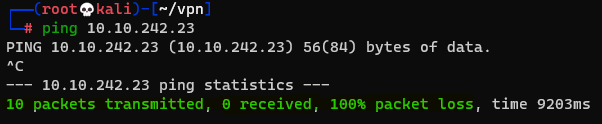
Question : Does the target (MACHINE_IP) respond to ICMP (ping) requests (Y/N) ?
Answer : N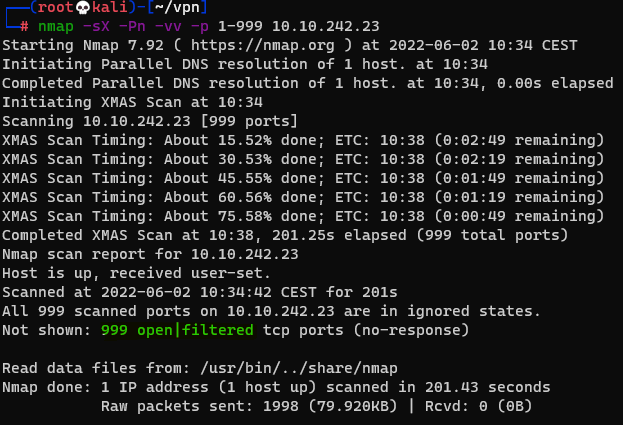
Question : Perform an Xmas scan on the first 999 ports of the target – how many ports are shown to be open or filtered ?
Answer : 999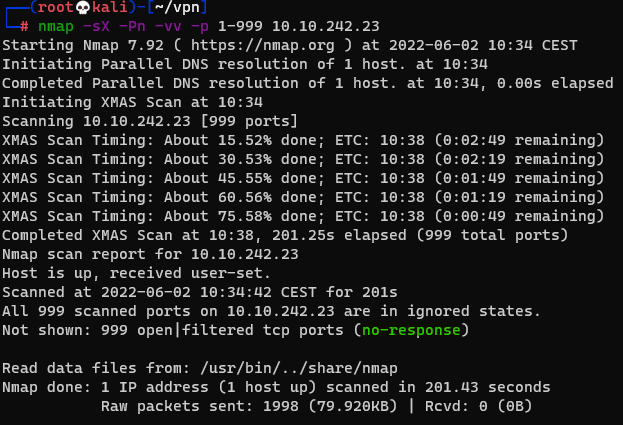
Question : There is a reason given for this – what is it ?
Answer : No Response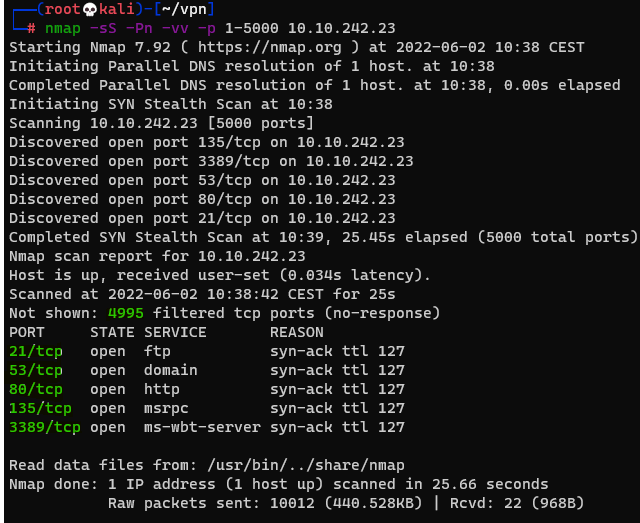
Question : Perform a TCP SYN scan on the first 5000 ports of the target – how many ports are shown to be open ?
Answer : 5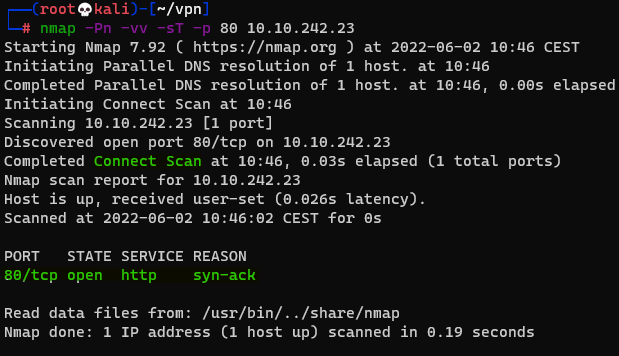

Question : Open Wireshark (see Cryillic’s Wireshark Room for instructions) and perform a TCP Connect scan against port 80 on the target, monitoring the results. Make sure you understand what’s going on.
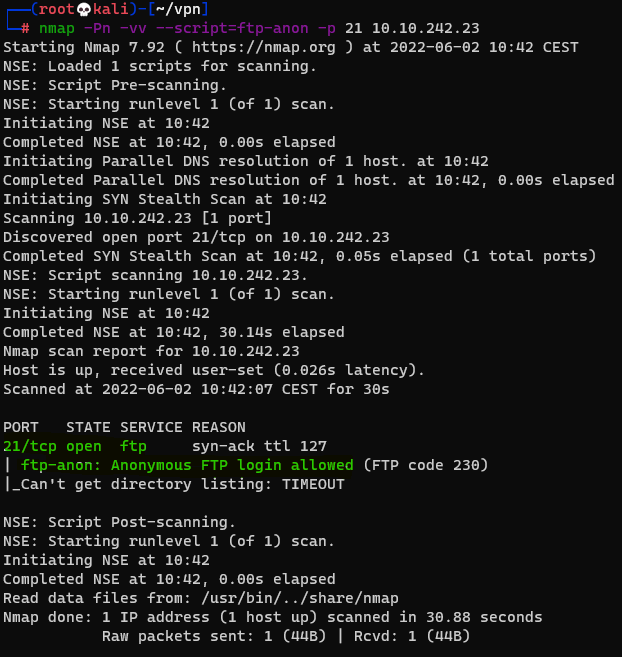
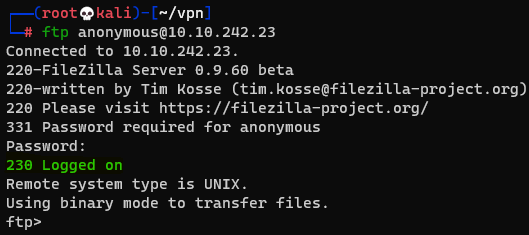
Question : Deploy the ftp-anon script against the box. Can Nmap login successfully to the FTP server on port 21 ? (Y/N)
Answer : Y